
من داخل التطبيقInside the app
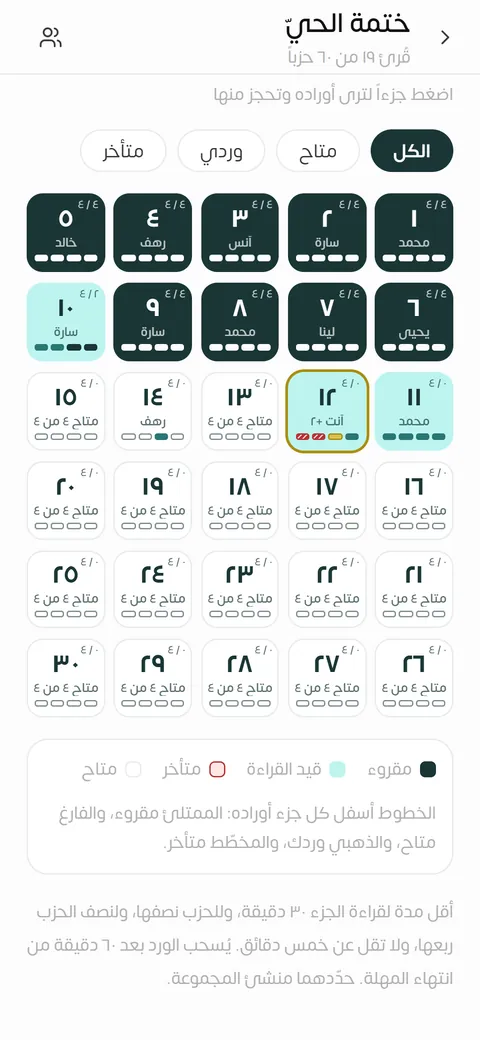
لوحة الختمة: كل ورد بلون حالهThe khatmah board, each portion in the colour of its state 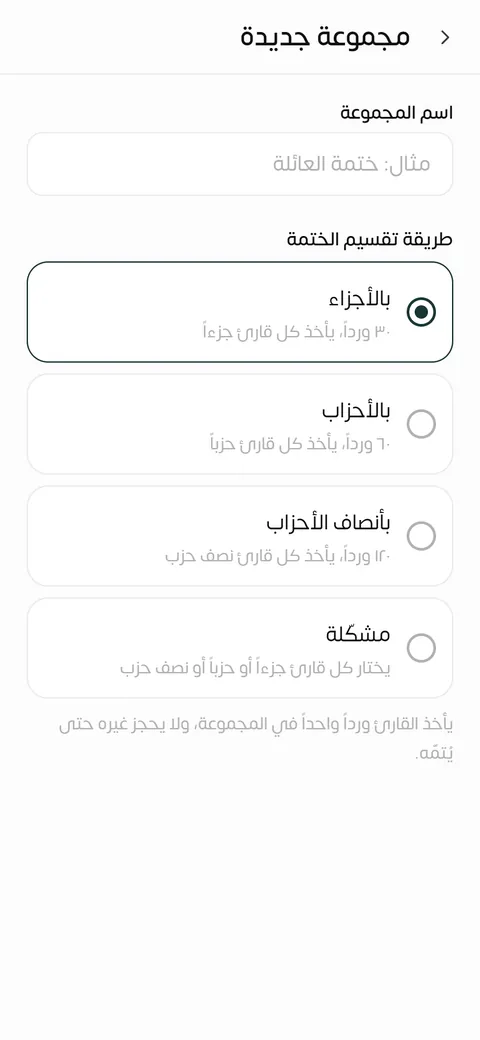
أربع طرق لتقسيم الختمةFour ways to share a khatmah 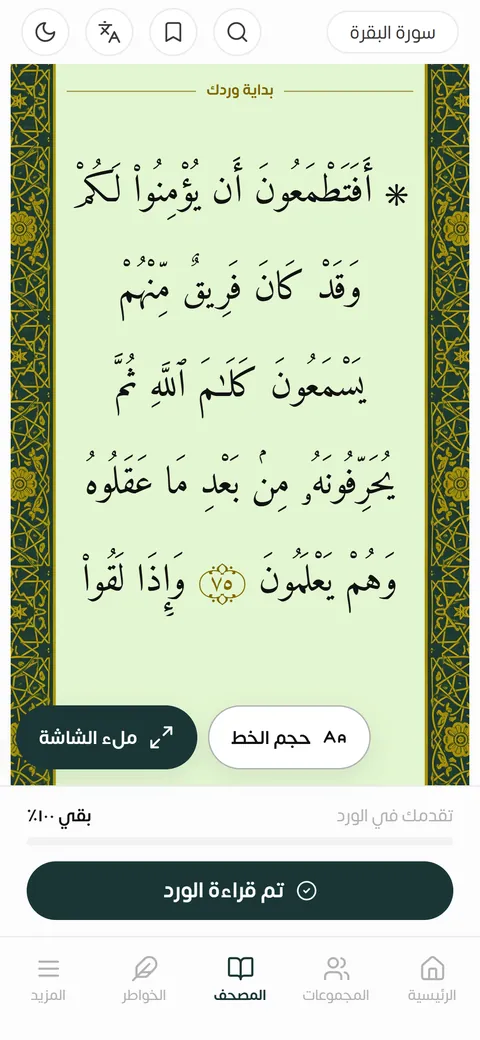
المصحف على وردك، مع المهلة الباقيةThe mushaf on your portion, with the time left 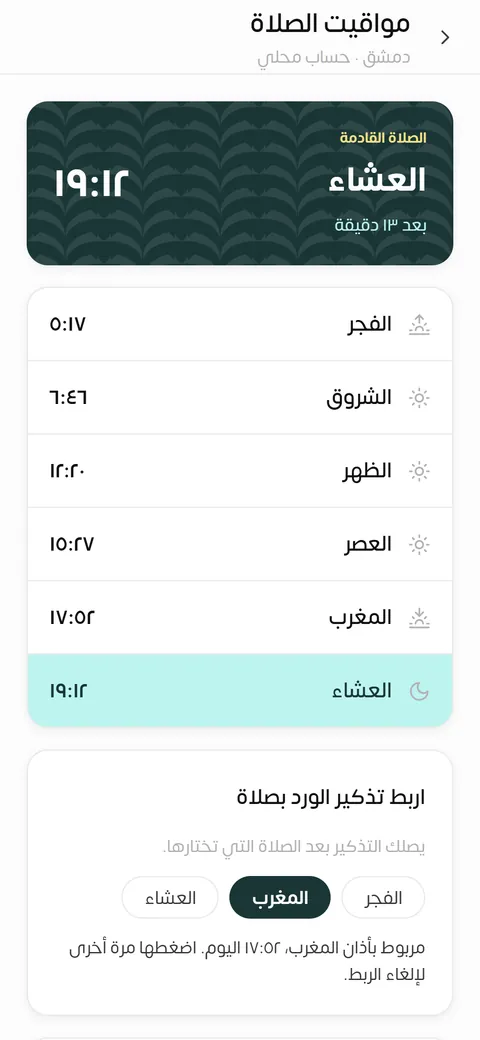
مواقيت الصلاة لمدينتكPrayer times for your city
ما في التطبيقWhat the app does
-
ختمة مع مجموعتك
أنشئ مجموعة وادعُ إليها برمز أو رابط تشاركه في واتساب. يحجز كل عضو ورده ويقرؤه، وتبيّن لوحة الختمة ما قُرئ وما هو قيد القراءة وما بقي متاحاً.
-
أربع طرق للتقسيم
بالأجزاء (٣٠ ورداً)، أو بالأحزاب (٦٠)، أو بأنصاف الأحزاب (١٢٠)، أو مشكّلة يختار فيها كل قارئ جزءاً أو حزباً أو نصف حزب.
-
المصحف مع التفسير والترجمة
نص المصحف بالرسم العثماني مضمّن في التطبيق ويعمل دون إنترنت، ومعه تفسير ابن كثير بالضغط المطوّل على الآية، وترجمة معانيه إلى الإنجليزية تحت كل آية.
-
تذكير بوردك
تذكير يومي في الوقت الذي تختاره، أو بعد أذان الفجر أو المغرب أو العشاء، وتنبيه قبل انتهاء مهلة وردك. يجدولهما هاتفك، فيصلانك والتطبيق مغلق.
-
مواقيت الصلاة والقبلة
المواقيت الست تُحسب على هاتفك للمدينة التي تختارها، دون إنترنت ودون تحديد موقعك، وبوصلة تبيّن اتجاه القبلة.
-
خريطة القرّاء
في «نشاط العالم» ترى عدد القرّاء في كل مدينة، أعداداً فقط بلا أسماء. تختار مدينتك إن شئت، ولا تظهر مدينة فيها أقل من ثلاثة قرّاء.
لا إعلانات، ولا أدوات تتبّع أو تحليل. تدخل برقم هاتفك ورمز تحقق، دون بريد ولا كلمة مرور، وتحذف حسابك من داخل التطبيق متى شئت. العربية أولاً مع واجهة إنجليزية كاملة، ومظهر نهاري وآخر ليلي.
تثبيت التطبيقInstall the app
تحميل مباشر للأندرويدDirect download for Android
تحميل مباشر للأندرويد (APK) Direct download for Android (APK)الإصدار 0.1.9 · Version
ملف تثبيت للهواتف التي تعمل بنظام Android. خطوات تثبيته تحت.
An installation file for Android phones. The steps to install it are below.
المتاجر الرسميةOfficial stores
يُضاف رابط كل متجر هنا حين يُعتمد التطبيق فيه.
Each store's link is added here once the app is approved there.
تثبيت ملف APK على هاتفك
- اضغط «تحميل مباشر للأندرويد (APK)» أعلاه، وانتظر حتى يكتمل تنزيل الملف.
- افتح الملف من إشعار التنزيل، أو من تطبيق الملفات في مجلد «التنزيلات».
- إن طلب الهاتف السماح بتثبيت التطبيقات من هذا المصدر، فاضغط «الإعدادات» وفعّل السماح للمتصفح الذي نزّلت به الملف، ثم ارجع واضغط «تثبيت».
- قد ينبّهك Google Play Protect لأن التطبيق لم يُثبَّت من المتجر. إن كنت نزّلت الملف من هذه الصفحة فاختر «مزيد من التفاصيل» ثم «التثبيت على أي حال». تختلف أسماء الأزرار قليلاً بين الهواتف.
- افتح «قناديل النور» وسجّل الدخول برقم هاتفك.
نزّل الملف من هذه الصفحة وحدها، لا من نسخة أرسلها إليك أحد.
للتحديث نزّل الملف الأحدث من هنا وثبّته فوق القديم، فتبقى بياناتك.
وإن لم يقبل Google Play لاحقاً تحديث النسخة المثبّتة من الملف، فاحذفها وثبّت التطبيق من المتجر. مجموعاتك محفوظة مع حسابك، وتعود حين تسجّل الدخول برقمك.
Qanadeel Al-Noor in English
Qanadeel Al-Noor is an Arabic-first app for completing the Qur'an together with a group. You create a group or join one with a code or a link, each member reserves a portion and reads it, and the khatmah is complete when everyone has read theirs. The whole interface is also in English.
- Group khatmah. Invite people with a code or a link shared on WhatsApp. The board shows what has been read, what is being read and what is still open.
- Four ways to share it. By juz' (30 portions), by hizb (60), by half-hizb (120), or mixed, where each reader picks a juz', a hizb or a half.
- The mushaf, with tafsir and translation. The Uthmani text is built into the app and works offline, with Tafsir Ibn Kathir on a long press and the English translation of the meanings under each ayah.
- Reminders. A daily reminder at a time you choose or after the fajr, maghrib or isha adhan, and an alert before your portion's deadline. Your phone schedules them, so they arrive with the app closed.
- Prayer times and qibla. The six times are calculated on your phone for the city you choose, offline and without locating you, with a qibla compass.
- The readers map. In World activity you see how many readers each city has: counts only, never names. Choosing your city is optional, and no city with fewer than three readers is shown.
No ads, and no tracking or analytics tools. You sign in with your phone number and a code, with no email or password, and you can delete your account from inside the app at any time.
Download and store links are in the install section above; each button carries an English label.
Installing the APK
- Tap Direct download for Android (APK) above and wait for the file to finish downloading.
- Open the file from the download notification, or from the Downloads folder in your Files app.
- If your phone asks to allow installing apps from this source, tap Settings, allow it for the browser you downloaded with, then go back and tap Install.
- Google Play Protect may warn you because the app is not installed from the store. If you downloaded the file from this page, choose More details, then Install anyway. Button names differ a little between phones.
- Open Qanadeel Al-Noor and sign in with your phone number.
Download the file from this page only, never from a copy someone sends you.
To update, download the newer file here and install it over the old one; your data stays.
If Google Play later will not update the copy installed from the file, remove it and install the app from the store. Your groups are kept with your account and come back when you sign in with your number.